
Ninety-five percent of IT leaders say system integration is what’s actually standing between their company and working AI. Almost none of that is a model problem.
What does it mean to integrate AI into legacy enterprise systems?
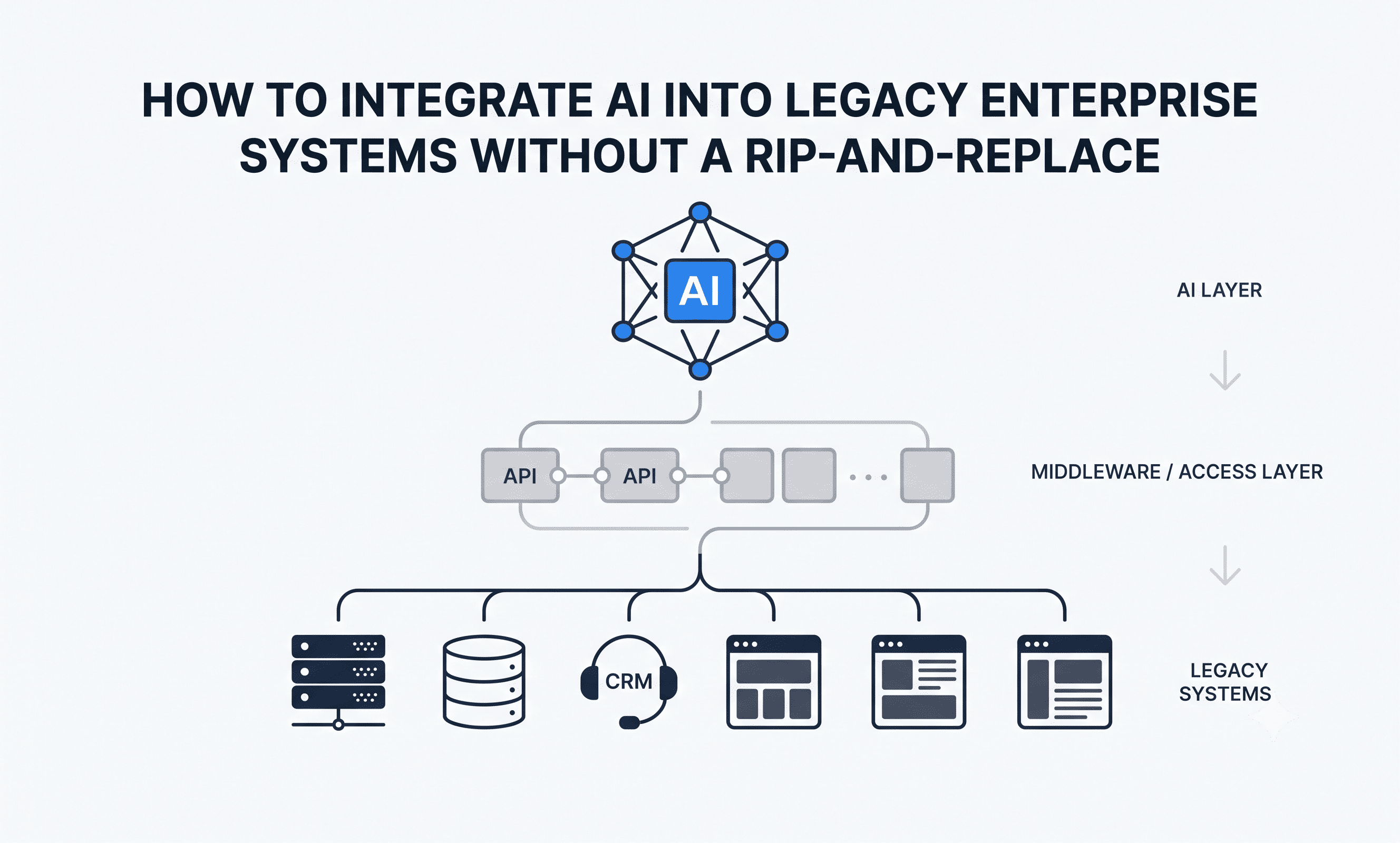
Integrating AI into legacy enterprise systems means connecting AI models to the data and workflows already running in production, mainframes, core platforms, on-prem CRMs, without replacing the underlying systems. It’s an integration and governance problem first, and a model selection problem a distant second.
KEY TAKEAWAYS
- Integration, not model capability, is the primary blocker. MuleSoft’s 2025 Connectivity Benchmark Report found 95% of IT leaders say integration issues impede AI adoption, with the average enterprise running roughly 897 applications and only about 28% of them actually connected.
- Legacy architecture is the leading cause of agentic AI project failure. Gartner projects that over 40% of agentic AI projects will be canceled by the end of 2027, citing legacy systems that can’t support modern AI execution demands as a primary driver.
- This isn’t unique to any one industry. A late-2025 Gartner survey of senior supply chain leaders found 56% cite integrating AI with legacy systems as a major challenge, and half report limited internal expertise to implement and manage it.
- The fix is architectural, not transactional. Companies that succeed treat the access layer, the middleware that lets AI safely query legacy data, as a standing piece of infrastructure, not a one-time integration task scoped per project.
Most AI vendor conversations start with the model and end with a demo. Almost none of them start with the question that actually determines whether the project ships: can this model see the same data, in the same sequence, with the same permissions, as the system it’s supposed to support. That question is where legacy integration lives, and it’s why so many technically sound AI pilots stall the moment they meet a real production environment.
Where the integration gap actually originates
1. API scarcity. A large share of enterprise systems, particularly mainframes and platforms built before the API-first era, were never designed for external programmatic access. Where APIs exist, they’re often narrow, built for one internal use case, and unsuited to the query patterns an AI system needs. MuleSoft’s benchmark data putting average enterprise app connectivity at roughly 28% reflects this directly: most of the enterprise application estate simply isn’t reachable in a governed, real-time way.
2. Data model mismatch. The same customer, account, or transaction is frequently represented differently across systems, different ID formats, different field names, different levels of normalization. An AI model querying across systems needs a consistent entity model to work from, and building that mapping is manual, unglamorous work that rarely gets scoped into the original project timeline.
3. Batch-oriented data versus real-time AI needs. Many legacy systems update on nightly or scheduled batch cycles. An AI agent responding to a live customer interaction can’t wait for a batch job to reflect a transaction that posted an hour ago. This mismatch is a common reason pilots that work fine in testing degrade once they’re exposed to live data latency requirements.
External anchors: MuleSoft 2025 Connectivity Benchmark Report; Gartner press release, June 2025, “Gartner Predicts Over 40% of Agentic AI Projects Will Be Canceled by End of 2027.”
The four-layer integration approach
Companies that get AI working reliably against legacy systems tend to build in this order, and skipping ahead is where most timelines break.
Layer 1: System and data inventory
Before any architecture decision, document every system the AI initiative needs to touch: what data lives there, how current it is, and what access currently exists, API, batch export, direct database query, or none at all. This step alone frequently reveals that the biggest blocker isn’t the AI use case, it’s that nobody has a current map of what’s connected to what.
Layer 2: A governed access layer
Rather than building point-to-point integrations per AI project, the systems that scale build a single middleware layer that mediates access to legacy data: normalizing formats, enforcing permissions, and exposing a consistent interface. This is the layer that turns “can the AI see this data” from a per-project engineering question into a solved problem the next initiative can reuse.
Layer 3: Governance and permissioning
AI models querying live, sensitive data raise access control and data residency questions that most legacy systems were never built to answer natively. Defining what the AI can see, what it can act on, and what has to route to a human needs to happen at this layer, before go-live, not during a post-incident security review.
Layer 4: Phased rollout by system tier
Not every legacy system is equally hard to integrate. Sorting systems into tiers, clean API access, limited or undocumented APIs, and no programmatic access at all, and rolling out AI capability against the easiest tier first builds a production track record before tackling the harder integrations. It also gives the organization real data on where the governed access layer needs to be hardened before it’s under more load.
Is your legacy environment ready?
| Criteria | Readiness signal |
| System inventory | No current map of connected vs. unconnected apps: start at Layer 1 |
| API coverage | Below industry average (~28% connected per MuleSoft) signals heavy middleware investment needed |
| Data model consistency | Same entity represented differently across systems: budget for mapping work upfront |
| Data freshness | Batch-only updates on systems the AI needs live: define an acceptable latency window before architecture decisions |
| Governance | No defined access/permission model for AI queries: this is a Layer 3 blocker, not a launch-week fix |
| Internal expertise | Limited integration or AI infrastructure staff (a challenge Gartner’s supply chain survey found in 50% of respondent organizations): consider embedded implementation support |
Five implementation risks to anticipate
1. Selecting the AI platform before scoping integration. When the AI tool is chosen first, integration complexity becomes a constraint discovered late, often after budget and timelines are already locked. The integration difficulty of the target systems should shape which AI approach is viable, not the other way around.
2. Treating governance as a final gate. Security and compliance review of AI systems querying production data takes real time. When it’s scoped only after a pilot succeeds, it becomes the single largest source of delay between a working demo and a live deployment, and it’s avoidable by involving those teams from day one.
3. Piloting against a clean, curated dataset. A pilot that only ever sees a sample of well-formed records tells you little about how the integration behaves against messy, inconsistent production data. Validate against real, unfiltered data before declaring integration complete.
4. Building one integration pattern for a patchwork environment. Most enterprises run a mix of modern and decades-old systems. Forcing a single integration approach across all of them over-engineers the easy systems and under-engineers the hard ones.
5. Skipping the latency conversation. Assuming “real time” without defining what that means for each system leads to architecture decisions that don’t match actual business requirements. Fraud detection and account inquiry have very different tolerance for delay, and that should be decided before, not after, the integration is built.
A decision framework
Legacy AI integration succeeds when the access layer is treated as reusable infrastructure rather than a one-time project cost. Inventory first, build the governed middleware layer once, and phase the rollout by integration difficulty rather than business urgency alone. Organizations that reverse this order, choosing the AI capability first and discovering integration complexity during implementation, are the ones whose projects show up in Gartner’s cancellation statistics.
For enterprises working through this inside contact center environments specifically, ETS Labs builds AI deployments, including QEval and Process Automation, to sit on top of existing CRM, telephony, and compliance infrastructure rather than requiring replacement, because most enterprises can’t take those systems offline to modernize them. More at etslabs.ai/professional-services.
Frequently asked questions
What’s the biggest blocker to integrating AI with legacy systems?
API and connectivity gaps, not model capability. MuleSoft’s 2025 benchmark found 95% of IT leaders cite integration issues as a barrier to AI adoption, with only about 28% of enterprise applications actually connected on average.
Does integrating AI require replacing legacy systems?
No. The integration typically happens at the API and middleware layer, sitting on top of existing infrastructure. Core systems, CRM, telephony, mainframes, generally stay in place.
Why do agentic AI projects fail more often in legacy environments?
Gartner projects over 40% of agentic AI projects will be canceled by 2027, citing legacy systems that can’t support the execution demands agentic workflows require as a leading cause, alongside unclear business value and rising costs.
How long does legacy AI integration typically take?
It depends heavily on the tier of system involved. Systems with existing, well-documented APIs integrate fastest; systems requiring middleware development or manual data mapping take substantially longer. Sequencing rollout by system tier, easiest first, is what keeps overall timelines realistic.
Is this an IT problem or a business problem?
Both. IT owns the technical integration work, but data governance decisions, what the AI can see and act on, require business, compliance, and security stakeholders involved from the start, not brought in after a pilot succeeds.

Related Posts
Contact Center AI: Strategic Decisions Your Organization Must Make
Six strategic decisions contact center leaders must make before choosing AI, from outcomes and augmentation…
Read More
Automated Quality Management Explained: Building QA Programs That Scale
Manual QA covers 3-5% of calls. Automated quality management covers 100%. See how contact centers…
Read More
Understanding Customer Journey: Mapping, Measurement, and Optimization
A strategic guide to customer journey mapping and measurement — how to move from whiteboard…
Read More
Contact Us
Let’s Talk!
Choose Services